Designing Accrue: An Accounting Firm Website Template
How the Accrue template makes a CPA firm site feel warm and trustworthy, from olive and marigold to a tax deadline calendar that never goes stale.

By Paul Peery
· 7 min read
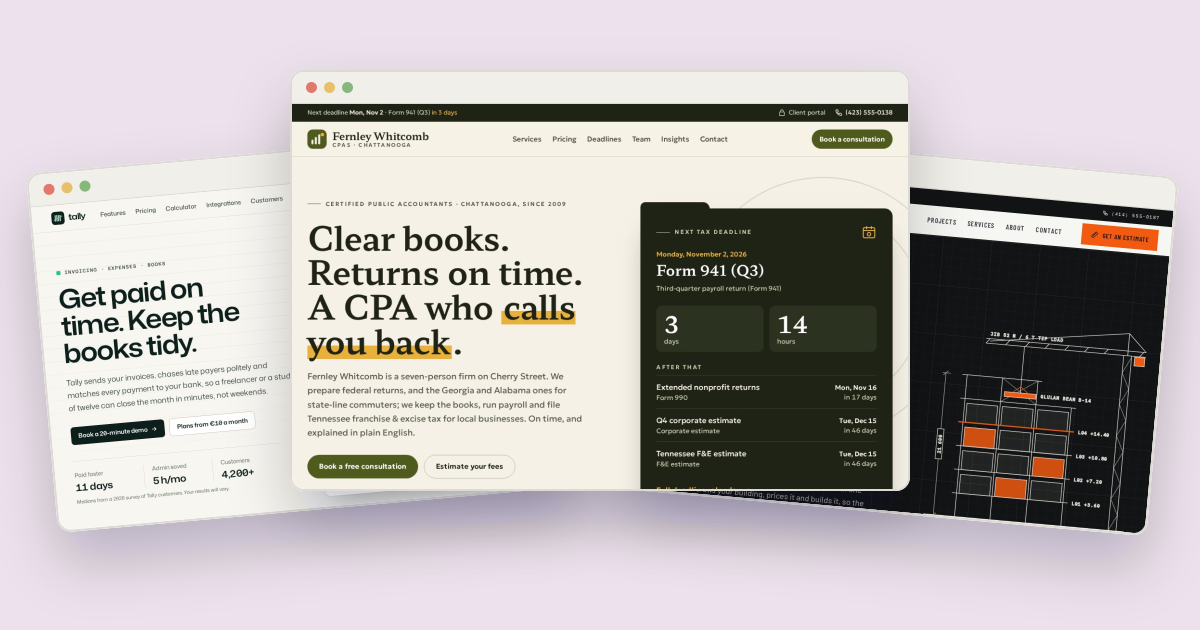
Accrue is a website template for an accounting firm, CPA practice or tax preparer. Most accounting sites are navy, stock photos of handshakes and a "Contact us" form. Accrue tries for something warmer that still reads as careful: olive and marigold on oat-colored paper, a serif with some character, and cards shaped like file folders. Underneath are the tools a firm's clients actually come back for: a tax deadline calendar, a document checklist, a fee estimator and consultation booking. This post walks through how each part is built and how to make it your own.
The demo business is Fernley Whitcomb CPAs, a fictional seven-person firm on Cherry Street in Chattanooga, Tennessee. The firm, its staff and its clients are all made up.
Two fonts: one with character, one that disappears#
Accrue loads two Google Fonts with a single <link> in every page's <head>:
<link rel="stylesheet" href="https://fonts.googleapis.com/css2?family=Geologica:wght@300..700&family=Hahmlet:wght@500..700&display=swap">Hahmlet is used for headlines, the big numbers on cards and the team's initials. It's a serif with crisp, sharply cut details, so the headlines feel considered rather than corporate. Geologica does everything else. It's a plain, open sans serif that stays readable in long service descriptions and small form labels.
Every amount, date and count also uses tabular, lining figures, so prices in the estimator and dates in the calendar line up in neat columns:
@utility num { font-variant-numeric: tabular-nums lining-nums; }For an accounting firm that detail matters more than usual: numbers that wobble from row to row look careless.
Olive, marigold and oat-linen paper#
The colors are Tailwind tokens in the @theme block of src/input.css:
--color-paper: #f5f1e6;      /* page background (oat linen) */
--color-ink: #1f2316;        /* text and dark bands (olive black) */
--color-olive: #4f5b1c;      /* buttons, links, brand marks (white text on it is AA) */
--color-marigold: #e8b13a;   /* highlights and fills; ink text on it, never marigold text on paper */
--color-due: #9a3b1e;        /* errors, "due soon" (AA on paper and card) */
Olive does the work navy usually does: it's dark enough to carry white button text at a readable contrast, but it reads as steady rather than cold. Marigold is the highlighter pen. The comment next to it is a rule the whole template follows: marigold is a fill with dark text on top, never a text color on the light paper, because yellow text on cream is unreadable.
The highlighter is a real class. A word in a headline wrapped in .mark gets a marigold stroke across its lower half, like someone ran a highlighter under it:
.mark { background: linear-gradient(transparent 62%, var(--color-marigold) 62%, var(--color-marigold) 90%, transparent 90%); padding: 0 .06em; }A hard-stopped gradient draws the stroke, so it wraps with the text across lines and needs no image.
File-folder cards#
The template's motif is the manila folder. Cards with the .folder class get a tab along the top-left edge, drawn with a pseudo-element:
.folder { @apply relative rounded-2xl rounded-tl-none border border-line bg-card; }
.folder::before {
  content: ""; position: absolute; left: -1px; top: -14px; height: 15px; width: 42%; max-width: 9rem;
  border: 1px solid var(--color-line); border-bottom: 0; border-radius: 10px 14px 0 0; background: var(--color-card);
}
The card's own top-left corner is squared off (rounded-tl-none) so the tab sits flush, and the tab is capped at 9rem so it stays a tab on wide cards. Two variants, .folder-ink and .folder-olive, recolor the card and the tab together. The fee estimator's total uses another paper detail: a zigzag torn-receipt edge made from two repeating diagonal gradients on .receipt::after.
A deadline calendar that never goes stale#
The deadlines page is the reason a client would bookmark the site. It lists federal and Tennessee tax deadlines for this year and next, filtered by taxpayer type, with a live countdown to the next one that also appears in the dark bar at the top of every page.
A list of dates typed into the HTML would be out of date within a year, and the demo has to stay correct for years. So DEADLINE_RULES in assets/js/data.js stores rules, not dates:
{ id: 'individual', short: 'Individual returns', month: 4, day: 15, rule: 'federal',
  who: ['individual'], title: 'Individual returns for {prev}, or an extension; …', forms: 'Form 1040, Form 4868' }
For each year, main.js builds the date from month and day, then moves it forward to the next business day. Holidays are worked out the same way, from rules rather than a list: Thanksgiving is the fourth Thursday in November, Memorial Day the last Monday in May, and Good Friday comes from a calculation of Easter. Fixed-date holidays that land on a weekend move to the Friday before or the Monday after:
function observed(key) {
  const w = weekday(key);
  return w === 6 ? addDays(key, -1) : w === 0 ? addDays(key, 1) : key;
}
The rule field decides which holidays count. federal deadlines skip federal holidays plus DC Emancipation Day, which the IRS observes. tn deadlines for Tennessee franchise and excise tax use a different set that includes Good Friday. When a deadline moves, the page says why. April 15, 2028 is a Saturday, and April 16 is a Sunday, so Emancipation Day is observed on Monday the 17th. The calendar shows the deadline on Tuesday, April 18 with the note "Moved from Sat, Apr 15: weekend, then DC Emancipation Day on Mon, Apr 17."
Every date and time is worked out in Eastern time (America/New_York) using Intl.DateTimeFormat, so the countdown turns over at midnight in Chattanooga, wherever the visitor is.
This is a demo, not tax advice: if you use the calendar for a real firm, check the rules against the IRS and your state's published dates each year.
A checklist that survives blocked storage#
Below the calendar is a tax-season document checklist for four kinds of client (individuals, the self-employed, businesses and nonprofits). Ticks are saved in the browser under accrue:checklist, so a client can come back to it over a few weeks.
Some browsers block storage, for example in a private window or a sandboxed preview. Instead of the checklist silently doing nothing, main.js falls back to an in-memory store:
const safeStorage = (function () {
  try { const s = window.localStorage; s.getItem('_'); return s; } catch (e) { /* blocked */ }
  const memory = Object.create(null);
  return {
    getItem: (key) => (key in memory ? memory[key] : null),
    setItem: (key, value) => { memory[key] = String(value); },
    removeItem: (key) => { delete memory[key]; }
  };
})();
Ticks then last for that page view, which is the best a browser with storage switched off allows.
The fee estimator#
Clients' first question is usually what it will cost. The pricing page answers with an estimator: entity type, monthly transactions, payroll employees, number of states and months of catch-up bookkeeping. It returns a monthly fee with a line-by-line breakdown.
All the numbers live in ESTIMATOR in data.js, so a firm can put in its own prices without touching the logic. Bookkeeping is priced in tiers by transaction count:
tiers: [
  { id: 'foundation', name: 'Foundation', max: 100, fee: 350 },
  { id: 'standard', name: 'Standard', max: 250, fee: 525 },
  { id: 'expanded', name: 'Expanded', max: 500, fee: 775 },
  { id: 'full-charge', name: 'Full-charge', max: 1000, fee: 1150 }
],
Above the last tier, each extra block of transactions adds a fixed amount. Annual business returns are spread across the months, so the monthly figure is what the client would actually pay. The inputs are written to the URL (?entity=scorp&tx=250&emp=4), so a client can send a quote to a business partner and the partner sees the same numbers.
Booking that knows tax season#
The contact page books a consultation from a rolling ten-day grid of 30-minute slots. Office hours come from BOOKING in data.js: weekday slots with a lunch break, shorter Fridays, and Saturday mornings only during tax season:
6: ['09:00', '10:00', '11:00'] // tax-season Saturdays onlywith taxSeason: { from: '02-01', to: '04-15' }. Office closures reuse the same holiday rules as the calendar, so the office is closed on the day after Thanksgiving and Christmas Eve every year without anyone updating a list.
Making it yours#
- Colors: change
--color-oliveand--color-olive-deepinsrc/input.cssand rebuild the CSS. The SVG illustrations use the same hex values, so search and replace them too. - Services and prices: everything data-driven is in
assets/js/data.js: the seven services, the estimator's prices, the checklists and the booking hours. A new entry inSERVICESgets its own page atservice.html?s=<slug>and appears in the booking form. - Deadlines: add or remove entries in
DEADLINE_RULES. A different state needs its own rule and holiday set, defined in the same way astn. - Photos: the team portraits and service illustrations are SVG drawn for the template. Replace them with photos at the same aspect ratios; the template's documentation lists the sizes.
Accrue's HTML version is a free download. It's also available for Next.js, Astro and WordPress, with the same design and interactions. If you're building for a finance business rather than a firm, Tally is a bookkeeping software site with an invoice in the hero, and Keystone shows the same estimator idea for a construction firm.

About the author
Paul Peery
Founder of Freeframe
Paul Peery runs Freeframe, which publishes complete multi-page website templates in HTML, Next.js, Astro and WordPress, and writes about getting small websites built, launched and kept up to date.