Designing Overprint: A Risograph Portfolio Template
How the Overprint template fakes a risograph print in the browser, from its three spot inks and fonts to halftones, misregistration and ink toggles.

By Paul Peery
· 8 min read
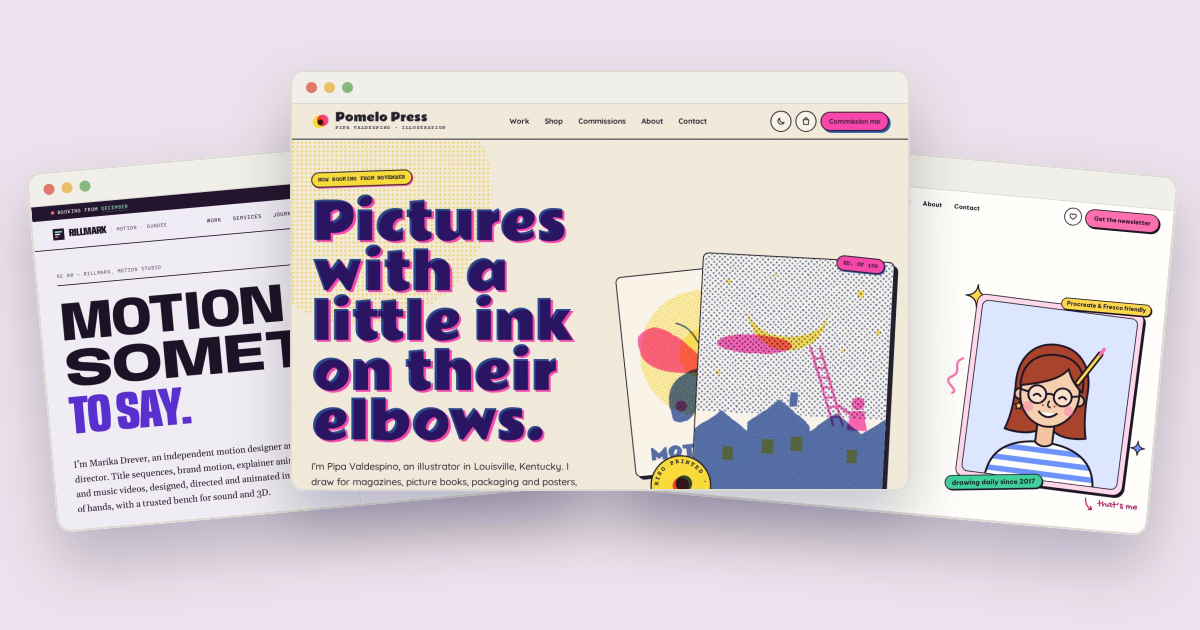
Overprint is a portfolio template for an illustrator that looks like a risograph print: three spot inks that mix where they overlap, halftone dots, paper grain and plates printed a hair off register. None of it is a photo or a texture file. The artwork is SVG drawn by JavaScript, the ink mixing comes from CSS blend modes, and the whole look is controlled by a handful of color tokens. This post walks through how each part works and how to change it for your own site.
The demo business is Pomelo Press, the fictional Louisville studio of illustrator Pipa Valdespino, who draws editorial illustration, picture books, packaging and posters and prints much of it herself. Pomelo Press, Pipa and the clients are all made up.
Three fonts with a print-shop job each#
Overprint loads three Google Fonts with one <link> in every page's <head>:
<link rel="stylesheet" href="https://fonts.googleapis.com/css2?family=Courier+Prime:wght@400;700&family=Quicksand:wght@500;600;700&family=Rammetto+One&display=swap">and names them as Tailwind tokens in src/input.css:
@theme {
  --font-display: "Rammetto One", "Cooper Black", "Arial Black", ui-rounded, sans-serif;
  --font-sans: "Quicksand", ui-rounded, "Avenir Next", "Segoe UI", system-ui, sans-serif;
  --font-mono: "Courier Prime", "Courier New", ui-monospace, monospace;
}
Each has a clear role:
- Rammetto One sets the headlines, card titles and wordmark. It's a heavy, rounded display face with wide, soft strokes, the kind of lettering that holds a solid block of ink on a gig poster or zine cover. The fallback stack goes to Cooper Black for the same reason.
- Quicksand (500, 600 and 700) handles body text, buttons and forms. Its rounded ends match the headline face, while its lighter weight keeps paragraphs easy to read next to such heavy titles.
- Courier Prime (400 and 700) is used for small details: stamps, prices and edition numbers. Typewriter lettering suits the parts of a print shop that look stamped or typed, like price tags, edition counts and order slips. The
.stampclass sets it in bold capitals with a little letter spacing.
Paper and three spot inks#
A riso prints one color per pass, so Overprint's palette is literally three inks on paper. The tokens live in the @theme block:
--color-paper: #f7f0e1;       /* page: uncoated cream stock */
--color-ink: #24202e;         /* text: riso black */

/* The three spot inks. Artwork prints with these and overprints with multiply. */
--color-pink: #ff48b0;        /* fluorescent pink */
--color-blue: #3255a4;        /* federal blue */
--color-yellow: #ffe23a;      /* yellow */
Fluorescent pink and federal blue are too light or too saturated for small text on cream paper, so each has a darker text version (--color-pink-text: #b8146b and --color-blue-text: #2b4a92) that meets WCAG AA contrast. The bright inks stay for fills, shadows and artwork.
Dark mode prints "the same inks on dark paper". A :root.dark block overrides the tokens with a dark stock (#1c1a23) and slightly lighter inks, so everything that uses the tokens, including the artwork, follows.
How the overprint works#
On a real riso, pink printed over blue makes violet, and yellow over pink makes orange-red, because the inks are translucent. Overprint gets the same effect with mix-blend-mode. Every ink layer in the artwork is an SVG group with the plate class:
/* Artwork plates: multiply on cream paper, screen on dark paper. */
.plate { mix-blend-mode: multiply; }
:root.dark .plate { mix-blend-mode: screen; }
.plate[data-off] { display: none; }
multiply darkens where colors overlap, like ink on light paper. On dark paper it would turn everything muddy, so dark mode switches to screen, which lightens instead.
The last rule hides a plate; the case studies use it, as shown below.
Misregistration#
Riso plates rarely line up perfectly, and that slight offset is part of the charm. Overprint does it in two places.
In the artwork, each project in assets/js/data.js has a reg list of offsets in pixels, one per ink:
inks: ['yellow', 'pink', 'blue'], reg: [[0, 0], [2, -2], [-2, 2]],The plate() function in assets/js/main.js wraps each ink's shapes in a group moved by its offset:
return '<g class="plate ' + INK_CLASS[ink] + '" data-ink="' + ink + '" fill="currentColor" transform="translate(' + off[0] + ' ' + off[1] + ')" filter="url(#ink-' + uid + ')">' +In headlines, the misreg class prints a second, pink copy of the heading just off the blue one:
.misreg { @apply relative isolate text-blue-text; }
.misreg::after {
  content: attr(data-ink) / ""; position: absolute; inset: 0; z-index: 1; pointer-events: none;
  color: var(--color-pink); mix-blend-mode: multiply; transform: translate(0.045em, 0.035em);
}
The pink copy comes from the heading's data-ink attribute, which must match the visible text. The / "" after attr(data-ink) gives the pseudo-element empty alternative text, so screen readers don't read the headline twice. The offset is in em, so it scales with the font size.
The same offset idea shows up in the buttons, chips and cards, which use hard box-shadows in a second ink, such as shadow-[4px_4px_0_var(--color-pink)] on a blue button.
Halftones, rough edges and paper grain#
Risograph images build tones from dots. Overprint defines two halftone patterns per ink in each SVG, a light screen and a dense one, rotated to a different angle for each ink, as printers do to avoid moiré:
const SCREEN_ANGLE = { pink: 15, blue: 45, yellow: 75 };Inside a drawing, @ht and @hd stand for that ink's light and dense halftone, so a shape written once as fill="@ht" gets the right dot pattern on whichever plate it sits.
Clean vector edges would give the game away, so every plate goes through an SVG filter built in artDefs(). One feTurbulence warps the edges slightly through feDisplacementMap, and a second, finer one becomes a mask that knocks tiny holes in the ink, the speckle you see in real riso prints. To get clean edges instead, the docs say to delete the filter attribute in plate().
The paper itself has grain too. body::before lays a fixed SVG noise tile over the whole page at 14% opacity, blended with multiply (screen and 6% in dark mode), and it's hidden when printing. Classes like .halftone-pink add dot fields made from radial-gradient backgrounds.
Case studies with switchable ink plates#
Each of the twelve projects has a case study at project.html?project=<id>, built from the same data. Its artwork comes in three stages, set up as an ARIA tablist you can move through with the arrow keys, Home and End:
- Sketch draws every plate as a gray pencil line. The
is-sketchclass turns blending off and replaces every fill with a thin stroke in the muted color. - Plates shows each ink on its own, captioned "Pass 1", "Pass 2" and "Pass 3", in print order.
- Final print shows the overprinted result, with a button for each ink.
The buttons are chips with aria-pressed. Pressing one toggles data-off on that ink's plates, and the CSS rule above hides them, so you can take the blue off the press and see what pink and yellow do alone. At least one ink always stays on: turning off the last one shows a short "Leave at least one ink on the press." message instead. A live region reports what's showing, such as "Showing fluorescent pink and yellow only."
The shop and the commission estimator#
Overprint is also a working storefront and booking flow for the demo studio.
The shop lists twelve prints, zines, stickers and postcards, each drawn from the same motifs as the portfolio. Products have size options with a price, an edition and stock ("Edition of 60 · only 12 left"), and sold-out sizes are disabled and crossed out. The cart is saved in localStorage and falls back to memory when the browser blocks storage. The checkout offers USPS Ground Advantage (free from $75), USPS Priority or pickup at the studio, adds 6% Kentucky sales tax for Kentucky orders and pickups, validates a test card, and ends with an order number and the next mail day. No payment is taken; the docs say to connect a real payment provider before selling anything.
The commission enquiry runs in four steps and shows a fee range and dated timeline as you go. Each commission type in data.js has a starting fee and phase lengths in working days:
editorial: {
  label: 'Editorial',
  blurb: 'Covers, spots and full-page pieces for magazines, newspapers and newsletters.',
  from: 650,
  phases: { sketches: 4, revisions: 2, finals: 4 },
  example: 'A cover and two spots'
},
The range is the starting fee times a license factor (from 1 for one-time print up to 2.4 for exclusive rights), times 1.2 for worldwide use and 1.25 for a rush, up to 1.6 times that, rounded to $50. Editorial for one-time print in North America reads "$650 to $1,050". The timeline starts at the first working Monday at least 14 days away, skips US holidays and the studio's winter break, and warns when the deadline is too soon even for a rush, which squeezes each phase to 70% of its usual length.
Making it yours#
Most changes are in two files:
- Inks and paper: change the tokens in the
@themeblock and in the:root.darkblock ofsrc/input.css, then runnpm run build. The artwork reads the inks through thetext-pink,text-blueandtext-yellowclasses, so it follows automatically. For a teal plate, set--color-blueand--color-blue-textto teal values. - Fonts: change the family in the Google Fonts URL on every page and the matching
--font-*token. - Content: projects, products, commission prices, shipping, tax and events all live in
assets/js/data.js. Copy a project entry, pick amotif, set itsinksandreg, and it shows up in the work grid with its own case study. - Real scans: to show your own artwork instead of the drawn motifs, put a 4:5 image inside the
.artbox and remove itsdata-artattribute. - Forms: none of the four forms send anything until you connect them. Replace the
successSwap(...)call in each handler with a request to your form service. - Events: fair dates roll forward while
KEEP_DEMO_CURRENTistrue. On a real site, set it tofalseand keep the list current.
The Overprint documentation covers every token, data field and feature in more detail, and the live demo shows the ink plates in action.

About the author
Paul Peery
Founder of Freeframe
Paul Peery runs Freeframe, which publishes complete multi-page website templates in HTML, Next.js, Astro and WordPress, and writes about getting small websites built, launched and kept up to date.